Home / Configuration Reference / Section: General / Advocacy Group Options
Advocacy Group Options
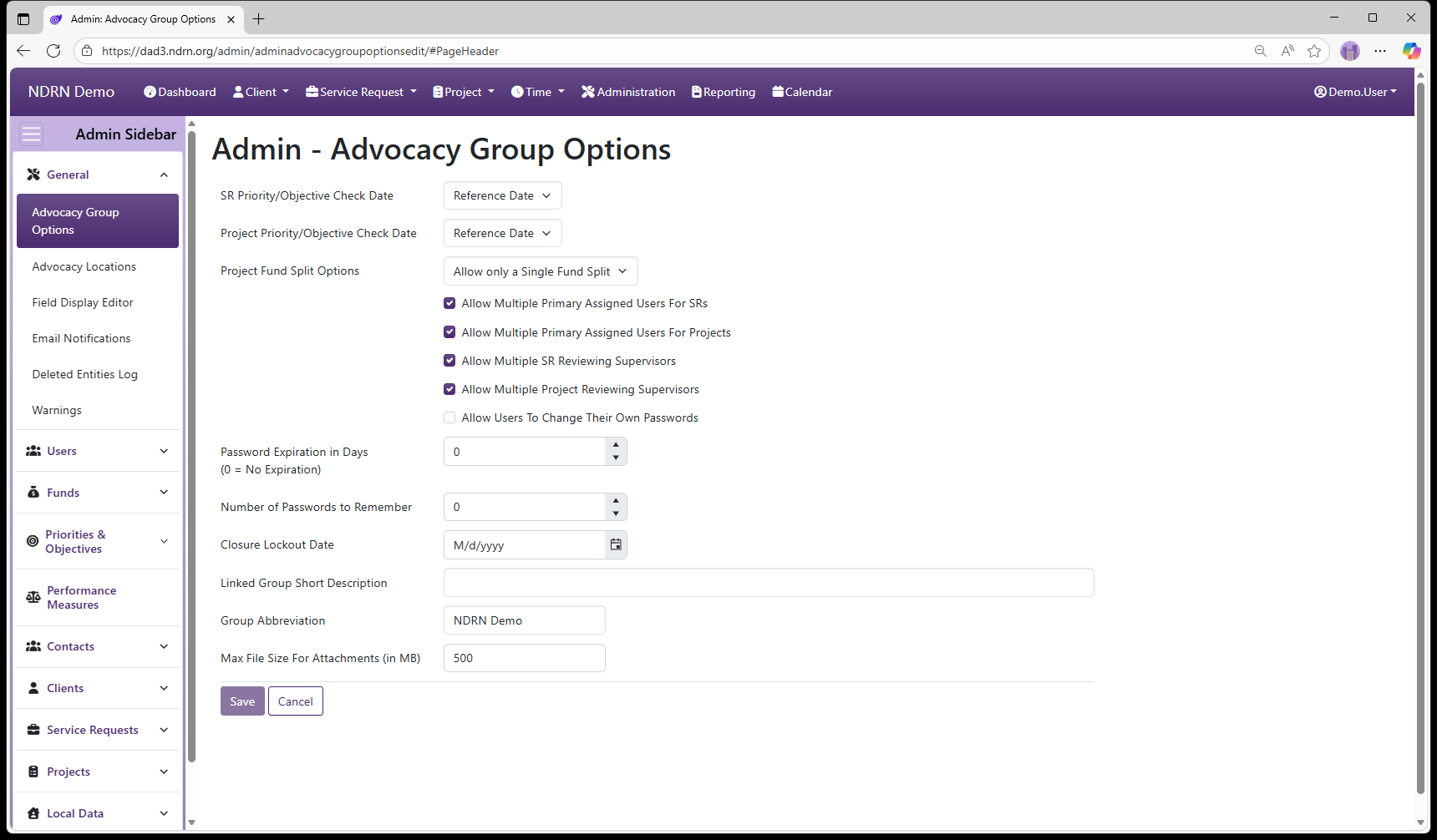
Page Type: Settings Form (URL: https://dad3.ndrn.org/admin/adminadvocacygroupoptionsedit)
The options on this page control basic functions related to rules, record review, passwords, display and attachments.
SR Priority/Objective Check Date
Dropdown selection options:
- Reference Date: The Priority/Objective selections for Service Requests will be those that are active on the Reference Date of the Service Request. (Note: Reference Date is equal to Open Date by default, but can be changed to accommodate changes to Priorities and Objectives for previously opened cases.)
- Open Date: The Priority/Objective selections for Service Requests will be those that are active on the Open Date of the Service Request.
Project Priority/Objective Check Date
Dropdown selection options:
- Reference Date: The Priority/Objective selections for Service Requests will be those that are active on the Reference Date of the Service Request. (Note: Reference Date is equal to Open Date by default, but can be changed to accommodate changes to Priorities and Objectives for previously opened cases.)
- Open Date: The Priority/Objective selections for Service Requests will be those that are active on the Open Date of the Service Request.
Project Fund Split Options
Fund Splits are used to control time allocations for Advocacy Groups using the DAD Timekeeper.
Dropdown selection options:
- Allow only a Single Fund Split**: **Adding a new Fund Split will automatically inactivate the prior fund split.
- Allow Multiple Fund Splits**:** Multiple Fund Splits can be active for a single Project. When this option is selected, both a Master Fund Split and Alternative Fund Split(s) can be selected for Project time.
Allow Multiple Primary Assigned Users For SRs
When checked, multiple users can be assigned as “Primary” to a single Service Request. If unchecked, there can be exactly one Primary User assigned to each Service Request.
Allow Multiple Primary Assigned Users For Projects
When checked, multiple users can be assigned as “Primary” to a single Project. If unchecked, there can be exactly one Primary User assigned to each Project.
Allow Multiple SR Reviewing Supervisors
When checked, multiple users can be assigned as “Reviewing Supervisor” to a single Service Request. If unchecked, there can be only one “Reviewing Supervisor”
Allow Multiple Project Reviewing Supervisors
When checked, multiple users can be assigned as “Reviewing Supervisor” to a single Project. If unchecked, there can be only one “Reviewing Supervisor”
Allow Users To Change Their Own Passwords
When checked, users can change their own password in the “Manage Account” section of their User Profile menu. If unchecked, only DAD Administrators can assign and change passwords.
Password Expiration in Days (0 = No Expiration)
To force users to apply regular password changes, set this to a value greater than 0.
Number of Passwords to Remember
To prevent users from using the same password more than once, DAD can remember a set number of prior passwords by setting this to a value greater than 0.
Closure Lockout Date
Service Requests and Projects cannot be closed with a Close Date prior to the Closure Lockout Date. This can be used to prevent backdating record closures after reporting data is finalized.
If left blank, there will be no date restriction when closing Service Requests and Projects.
Linked Group Short Description
For use by Agencies with multiple linked advocacy groups for labeling purposes. Left blank by default. 25-character maximum length.
Group Abbreviation
This text will replace instead of “DAD” for the homepage link on the Main Menu. Left blank by default. This field is used primarily by Agencies with multiple advocacy groups. 10-character maximum length.
Max File Size For Attachments (in MB)
This setting limits users from uploading extremely large file attachments. This value is set to 500 MB by default.